
Parallel composing can be defined as “a way of describing how old and new literacies… may be fruitfully taught side by side” (Leander, 2009). In other words, two types of “texts” can be used together in order to expand one’s understanding of both texts.
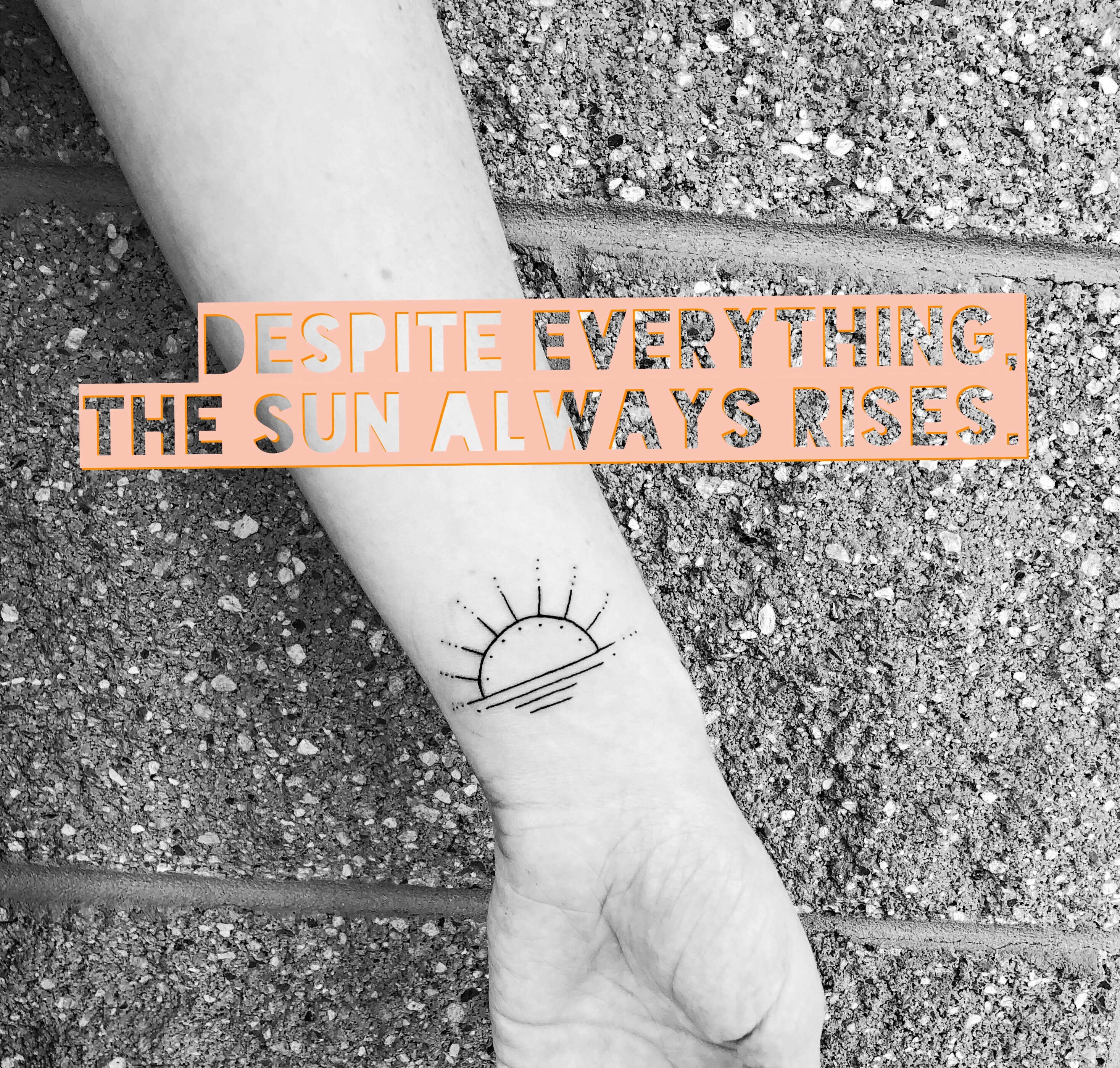
For this particular assignment, I decided to write a six-word memoir and overlay it onto a photo of my new tattoo, which I got this weekend 🙂 I did this using a photo-editing app called MOLDIV. Before I get into the specifics of the app, I’d like to explain how the photo I chose works with the six-word memoir I wrote to give students a deeper understanding of both texts. Alone, the picture of my tattoo is just that; a picture of a tattoo of a sunrise. There’s no way to know the symbolism or the deeper meaning behind the tattoo. When you add the six-word memoir to the photo, however, it’s clear that there’s more to the sunrise than meets the eye; the tattoo is a reminder that despite the hardships of life, the sun always rise – better times always follow.
Traditionally, a six-word memoir is taught as a stand-alone mini-essay in a class. I like the idea of making students partake in parallel composing by adding a photo to the six-word memoir to add another layer of meaning. Students not only have to craft the memoir, they also have to think about what visual they can add to aid in their audience’s understanding. In other words, what visual would help to enhance the message they are trying to convey with their six-word memoir?
Now – about MOLDIV.
MOLDIV is a free smartphone app that can be used to edit and add text and images to photos. You begin by uploading a photo, and then you can add filters and text as needed. The app is very user-friendly and intuitive; I can’t imagine students would have a hard time figuring out how to use it, but there is a short tutorial when one downloads the app. The app is available on both the App Store and on Google Play, so any student with a SmartPhone would easily be able to access it. The process of editing a photo and adding text is quick and easy, and there’s plenty of room for students to be creative; there are over fifty filters as well as a plethora of colors and fonts for the text to be used. If students want to get extra creative, they can even add little shapes and graphics. In short, they can make it look like whatever they’d like. The images that are created are easy to download, so this could be something that teachers print and post around the class. Posting this kind of personal student work would convey the message to students that we, the teachers, care about who they are and what they represent.
One constraint that MOLDIV has is that if a student doesn’t have a Smartphone, teachers will have to find a tablet for them to use. Most schools have tablets available, so it’s not a huge problem, but it is something that teachers should plan for.
Some tips when using MOLDIV:
- Make sure that students are able to connect to WiFi to download, or that you ask them to download it before coming to class. As with all apps, it could take a little while to get it installed, so plan for that.
- Although there’s a short tutorial once the app is installed, it would be helpful to model the creation of one of these for students. That way, you can show them how to navigate the various components of the app and students will feel equipped to do so themselves.
- Make sure to check out tablets for students who don’t have access to an iPhone. Make sure you are able to install the app prior to class.
If anyone else has used parallel composing to enhance students’ understandings of texts, I’d love to hear your ideas! This is something I’d really like to incorporate into my classroom in the coming year.
 The High-Tech Teacher